Turn on suggestions
Auto-suggest helps you quickly narrow down your search results by suggesting possible matches as you type.
Showing results for
SALE EXTENDED 70% OFF QuickBooks for 3 months* Ends 12/8
Buy nowWelcome to the Community, crhodes!
It's nice to see new users here in the website. I have some insights to share about inactive vendors and guide you through reviewing their accounts.
To make sure we're on the same page, are you referring to the vendor's transactions? If so, making vendors inactive won't completely remove them from your list. The transactions associated with them remain part of your company data.
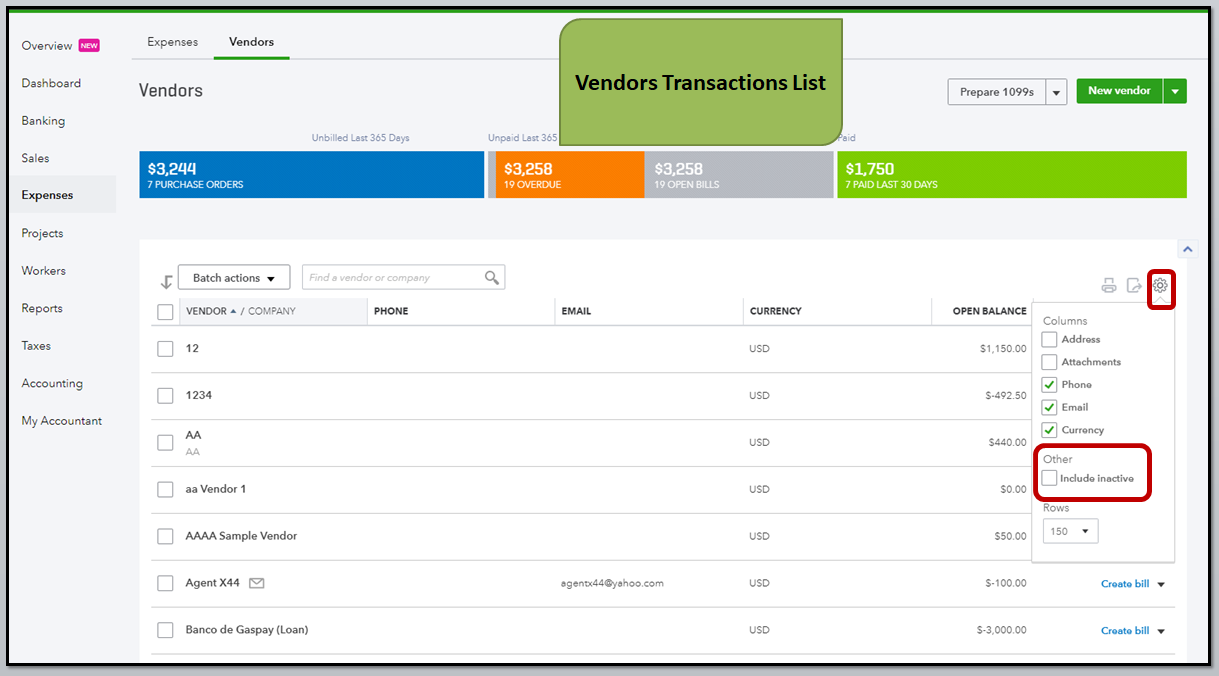
You can view the transactions from the Vendors transactions list. Here are steps to guide you through:
These steps will let you view the accounts/transactions of an inactive vendor.
Please know you can continue to reach me here with any additional questions or if you're referring to something different. Thanks for coming to the Community, wishing you continued success.