Turn on suggestions
Auto-suggest helps you quickly narrow down your search results by suggesting possible matches as you type.
Showing results for
SALE EXTENDED 70% OFF QuickBooks for 3 months* Ends 12/8
Buy nowThanks for reaching out to us, @actionglass. I'd like to help share some information about making changes to your customer's account in QuickBooks Online.
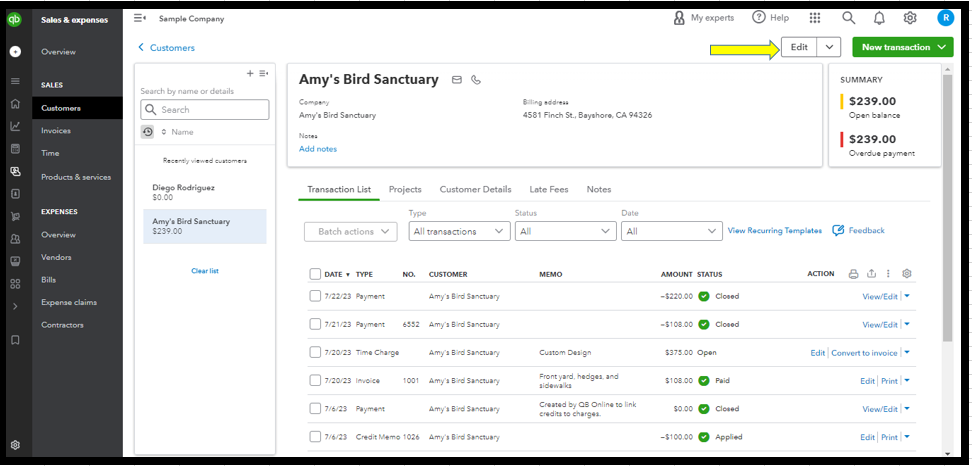
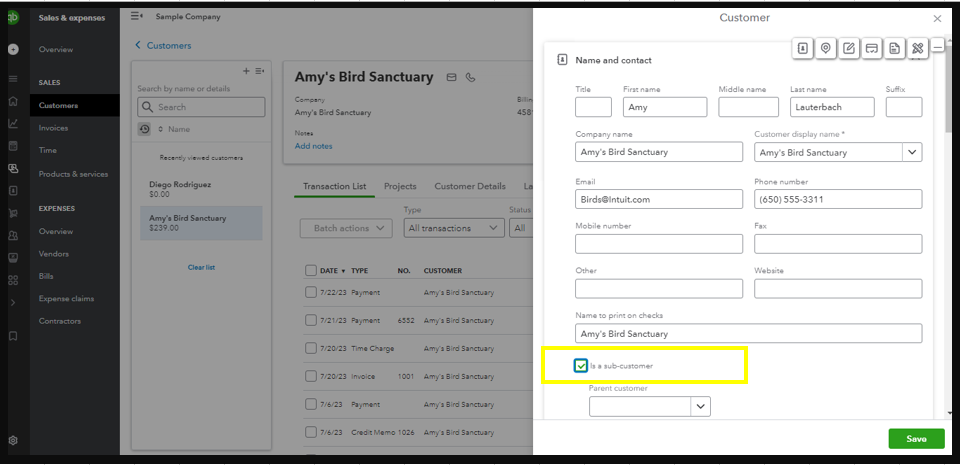
To properly set up a parent account for a customer, it is important to follow a specific sequence. First, you should make any necessary changes to the sub-customer's account. Once those changes have been made, you can then designate it as a parent account by editing the sub-customer's profile and unchecking the Is a sub-customer checkbox.
See the screenshot below for your visual reference.
Please check this article on how to add, delete, merge, and restore customers in QuickBooks Online: Manage your customer list.
In addition, the links below contain resources that will guide you on how to handle customer-related activities such as creating invoices, managing payments, customizing sales forms, and processing credit or refunds, to name a few.
Reach out to me again if you have any clarifications or questions on how to manage customers in QBO. I’ll be around to assist further. Have a good one.

