
- Mark as New
- Bookmark
- Subscribe
- Permalink
- Report Inappropriate Content
Upgrading to Quickbooks Desktop Pro 2024
I currently am using Quickbooks Desktop Pro Plus 2022 and need to upgrade it to 2024. I was sent an email giving me instructions. The problem is the instructions don't help. It gives me a link with a video and the video tells me I have to purchase my new version first. The email states the upgrade to 2024 is supposed to be free to current subscribers. As usual Quickbooks never makes anything easy. I have a multi user edition but am currently in the single mode. Has anyone gone through the process and can shed some light on it for me?
Solved! Go to Solution.

- Mark as New
- Bookmark
- Subscribe
- Permalink
- Report Inappropriate Content
Other questions
1. Open your company file on QB Desktop 2022 and secure a backup file (*.qbb).
2. Login to CAMPS and you should find the installation code for your 2024.
3. Install it and restore the backup file.
4. Don't remove or uninstall your QB Desktop 2022 until you can run QB Desktop 2024 withput any issue.
- Mark as New
- Bookmark
- Subscribe
- Permalink
- Report Inappropriate Content
Other questions
Thanks so much for the help. Worked perfectly!!

- Mark as New
- Bookmark
- Subscribe
- Permalink
- Report Inappropriate Content
Other questions
I have Desktop 2021 and I can't send invoices by eamil anymore. I also am having trouble upgrading to Desktop 2024. Please help.


- Mark as New
- Bookmark
- Subscribe
- Permalink
- Report Inappropriate Content
Other questions
You can no longer send invoices via email in QuickBooks Desktop (QBDT) 2021 or earlier versions, as this product has been discontinued, 537914029.
Regarding upgrading to QBDT 2024, you can consider purchasing a new QBDT Enterprise subscription or switching to QuickBooks Online (QBO), as direct upgrades from older, discontinued versions like QBDT 2021 are no longer available. If you choose QBDT Enterprise, make sure to back up your company file first and restore it in the new version.
You can also check out this article for more details on the service discontinuation for QBDT 2022 and earlier versions: QuickBooks Desktop 2022 service discontinuation policy.
Feel free to reply to this thread if you need further help.


- Mark as New
- Bookmark
- Subscribe
- Permalink
- Report Inappropriate Content
Other questions
What is CAMPS?

- Mark as New
- Bookmark
- Subscribe
- Permalink
- Report Inappropriate Content
Other questions
Thank you for reaching out, @RSS1720. It seem like you're interested in learning more about CAMPS, so let me explain. CAMPS stands for Customer Account Maintenance Portal Services, and it’s essentially the central dashboard where you can manage everything related to your Intuit account and QuickBooks Desktop (QBDT) products.
Through CAMPS, you can view subscription information, update billing details, download product licenses, and handle account renewal processes seamlessly.
For example, if you need your license or product number because you are reinstalling QuickBooks on a new computer, this platform can help you retrieve the necessary information. To access CAMPS, here's how:
- Visit the CAMPS portal by going to: camps.intuit.com
- Use your Intuit Account credentials to log in.
- If you see multiple products to choose from, select QuickBooks Desktop to go to CAMPs.
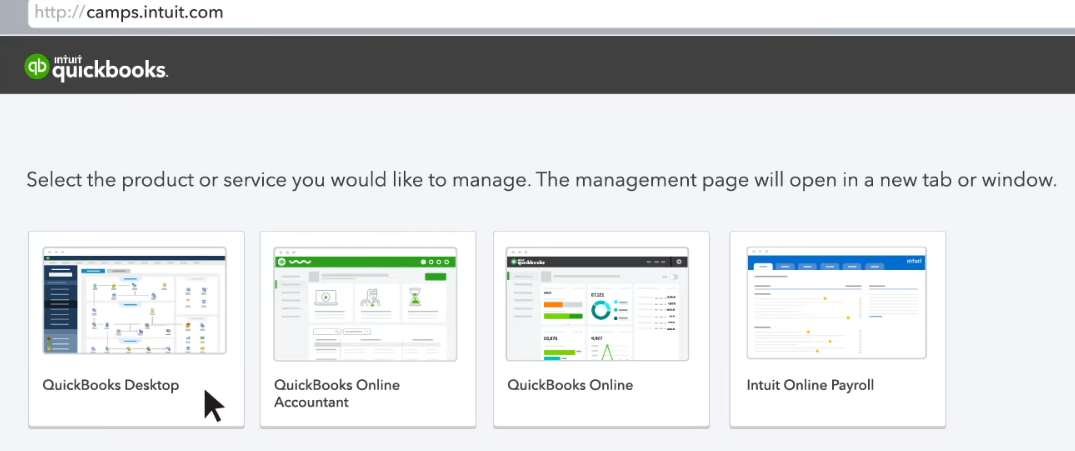
I hope this clears things up for you. If you have more specific questions about what you’re looking for or about CAMPS, feel free to let me know by commenting below. I’m happy to guide you through it. Take care.
- Mark as New
- Bookmark
- Subscribe
- Permalink
- Report Inappropriate Content
Other questions
What QB Desktop year version do you have? 2024 or older?
