
- Mark as New
- Bookmark
- Subscribe
- Permalink
- Report Inappropriate Content
How do i import sales receipts from a csv? There are instructions to go to import data and choose the sales receipts option, but i'm not seeing that option.

- Mark as New
- Bookmark
- Subscribe
- Permalink
- Report Inappropriate Content
Banking
Prepare your Sales Receipts data with the following template
| RefNumber | Customer | TxnDate | ShipDate | ShipMethodName | TrackingNum | Location | Class | BankAccount | PaymentMethod | PaymentRefNumber | BillAddrLine1 | BillAddrLine2 | BillAddrLine3 | BillAddrLine4 | BillAddrCity | BillAddrState | BillAddrPostalCode | BillAddrCountry | ShipAddrLine1 | ShipAddrLine2 | ShipAddrLine3 | ShipAddrLine4 | ShipAddrCity | ShipAddrState | ShipAddrPostalCode | ShipAddrCountry | PrivateNote | Msg | Currency | ExchangeRate | BillEmail | ToBePrinted | ToBeEmailed | ShipAmt | ShipItem | TipAmt | DiscountAmt | DiscountRate | TaxRate | TaxAmt | DiscountTaxable | LineServiceDate | LineItem | LineDesc | LineQty | LineUnitPrice | LineAmount | LineClass | LineTaxable |
| 101 | Janice Johnson | 01/10/2020 | Checking | Check | 20013 | 110 Main Street | Suite 2000 | Dallas | TX | 99875 | 110 Main Street | Suite 2000 | Dallas | TX | 99875 | Special Handling | Thank you for your order! | [email address removed] | N | Y | 0.02 | Y | Leather Case | Leather Case | 2 | 10 | TAX | ||||||||||||||||||||||
| 101 | Janice Johnson | 01/10/2020 | Checking | Check | 20013 | 110 Main Street | Suite 2000 | Dallas | TX | 99875 | 110 Main Street | Suite 2000 | Dallas | TX | 99875 | Special Handling | Thank you for your order! | [email address removed] | N | Y | 0.02 | Y | Gift Cards | Gift Cards | 2 | 5 | TAX | ||||||||||||||||||||||
| 102 | Leonard Walker Inc | 01/10/2020 | Checking | Cash | paid cash | 9 Winding Road | Winchester | NY | 12345 | 9 Winding Road | Winchester | NY | 12345 | Thank you for your order! | [email address removed] | Y | N | Y | Handhelds | Portable Game Player | 1 | 100 | TAX | ||||||||||||||||||||||||||
| 102 | Leonard Walker Inc | 01/10/2020 | Checking | Cash | paid cash | 9 Winding Road | Winchester | NY | 12345 | 9 Winding Road | Winchester | NY | 12345 | Thank you for your order! | [email address removed] | Y | N | Y | Software | 1 Year Warranty | 1 | 25 | TAX | ||||||||||||||||||||||||||
| 102 | Leonard Walker Inc | 01/10/2020 | Checking | Cash | paid cash | 9 Winding Road | Winchester | NY | 12345 | 9 Winding Road | Winchester | NY | 12345 | Thank you for your order! | [email address removed] | Y | N | Y | Extended Warranty | 1 Year Extended Warranty | 1 | 5 | TAX | ||||||||||||||||||||||||||
| 103 | Lisa Smith | 01/10/2020 | Checking | Check | 4591 | 19 Jerico Drive | Bensalem | PA | 84256 | 19 Jerico Drive | Bensalem | PA | 84256 | We appreciate your business! | [email address removed] | N | Y | Gift Certificate | $50 Gift Certificate | 1 | 50 | NON |
then utilize an importer tool to proceed
https://transactionpro.grsm.io/qbo

- Mark as New
- Bookmark
- Subscribe
- Permalink
- Report Inappropriate Content
Banking
I’ve come to show you the ways how to get your sales receipts imported to QuickBooks, @xtrfishingcharte.
You can import your sales receipts to QuickBooks Online using a third-party application. QuickBooks offer tools that are compatible and can smoothly move your transactions.
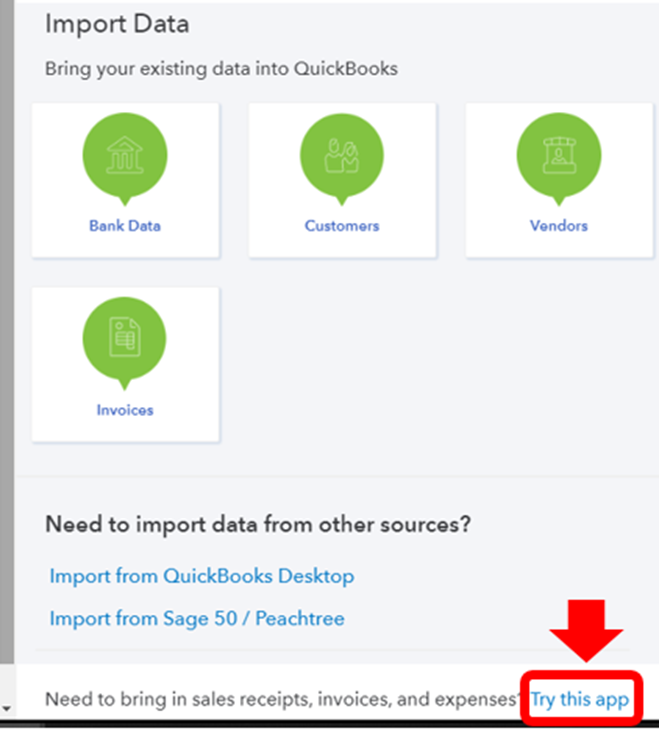
Under the Import Data page, you can choose a tool directly by selecting the Try this app link. I’m glad to show you the steps:
- Open your QuickBooks account.
- Select the Gear icon, then go to Import Data.
- In the bottom part, you’ll see “Need to bring in sales receipts, invoices, and expenses? Try this app.”
- Please select the link and then choose the best tool for you.
You can also visit our Apps Center or your Apps menu to get an importer tool. Here’s how:
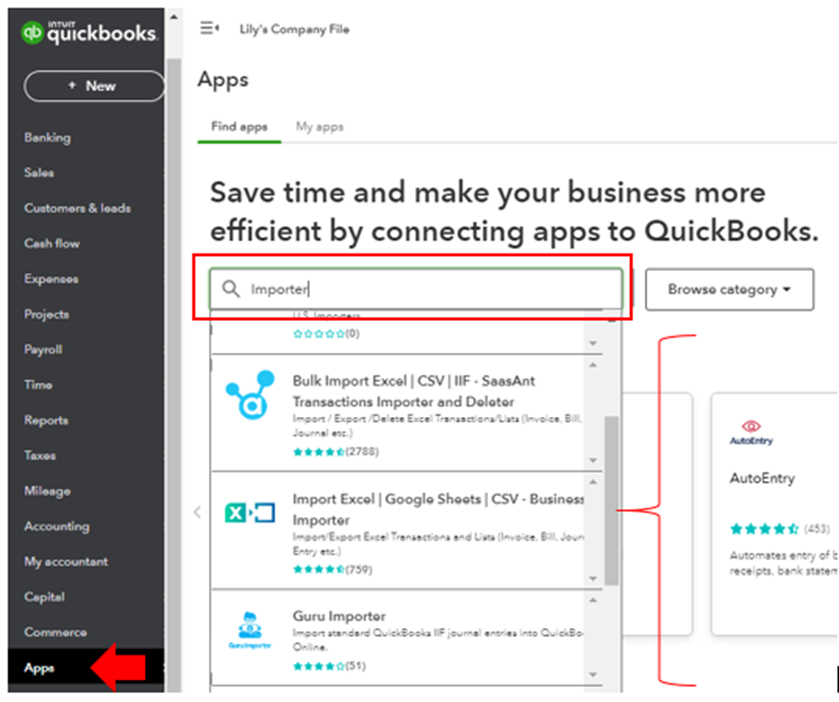
- Select Apps from your left pane.
- Type in “Importer” in the Search field, then choose an application.
- Click Get app now once decided.
You can click the Overview tab to learn more about the application and how it works. Contact and support info is also available if you need assistance with the process.
Once imported, you can use this guide to personalize them: Customize invoices, estimates, and sales receipts in QuickBooks Online. It includes steps to add certain info and make edits.
If you have any other questions or concerns besides uploading sales receipts, please let me know by tapping the Reply button below. I want to make sure everything is covered. Have a good day!

