Turn on suggestions
Auto-suggest helps you quickly narrow down your search results by suggesting possible matches as you type.
Showing results for
Hello, @afmechservices-g. Thanks for reaching out with your question about merging customer transactions from your point-of-sale (POS) system into QuickBooks. I completely understand how managing a daily total alongside individual transactions can feel a bit tricky.
Before we dive into the details, could you please clarify whether the total amount from your POS is already downloaded into your banking feed? If so, you can match the downloaded transaction with the corresponding payment you’ve already entered. This will link them together and prevent any duplicates from slipping through.
Here’s how to do it:
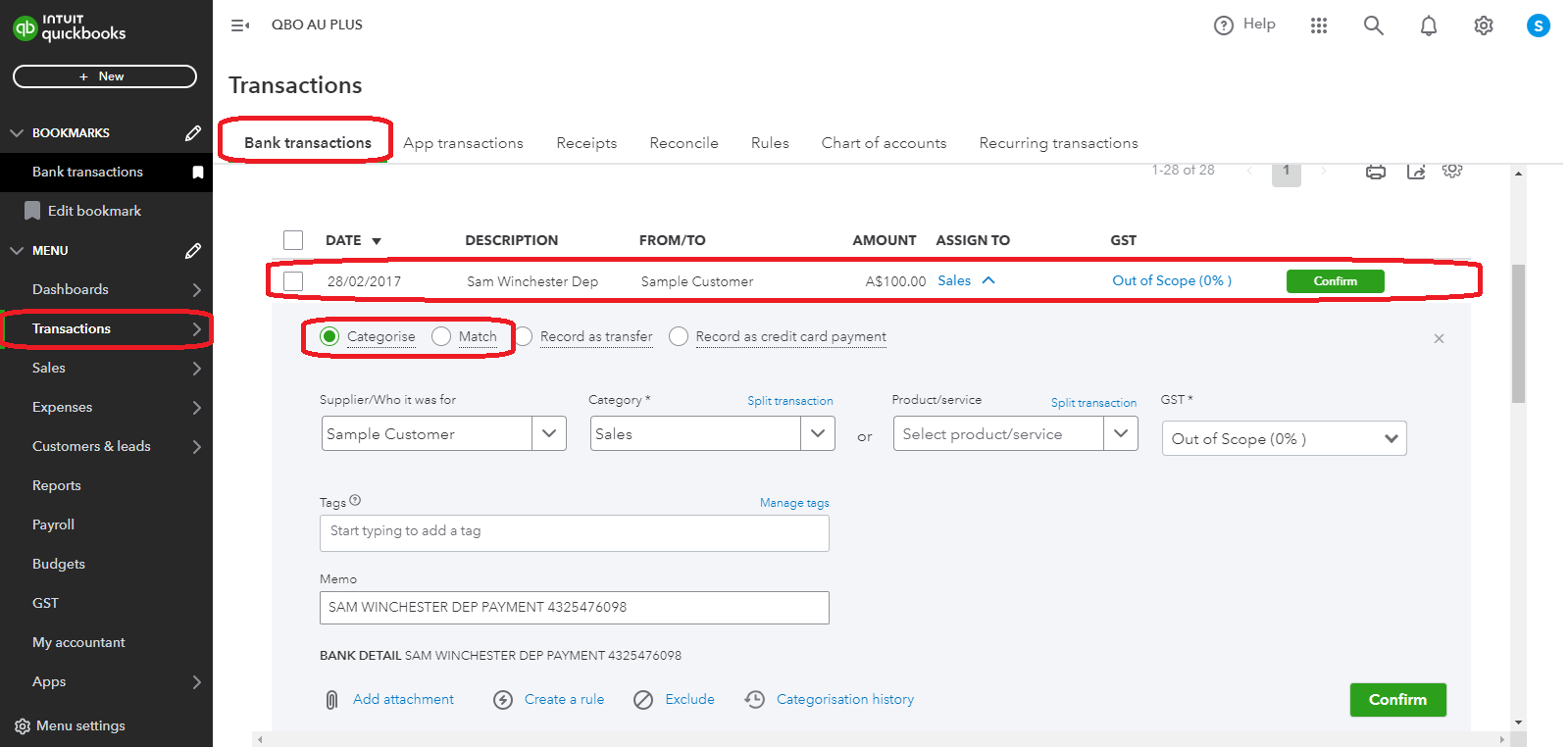
This process lets QuickBooks know that the downloaded record is the same as the one you’ve entered, effectively linking them to avoid any duplicates.
For more detailed information, visit this article: Match online bank transactions in QuickBooks Online.
If you’re referring to something different, just let me know in the comments. I’m here to help ensure you have a smooth ride managing your finances. Wishing you a week full of seamless transactions!
You have clicked a link to a site outside of the QuickBooks or ProFile Communities. By clicking "Continue", you will leave the community and be taken to that site instead.
For more information visit our Security Center or to report suspicious websites you can contact us here


